Ubuntu Desktopのターミナル初期設定メモ
ターミナル自体の設定
完成形画像から
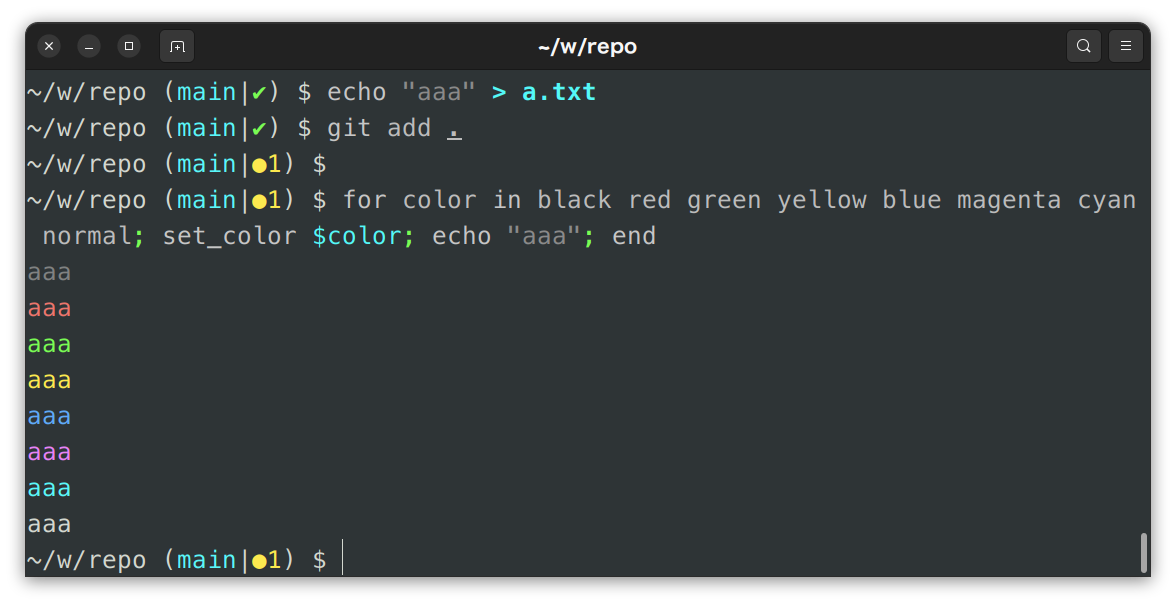
内容メモ
~ $ dconf dump /org/gnome/terminal/
[legacy/keybindings]
copy='<Primary>c'
paste='<Primary>v'

[legacy/profiles:/:b1dcc9dd-5262-4d8d-a863-c897e6d979b9]
audible-bell=false
background-color='rgb(46,52,54)'
bold-is-bright=true
cell-height-scale=1.0
cell-width-scale=1.0
cursor-blink-mode='off'
cursor-shape='ibeam'
default-size-columns=100
default-size-rows=30
font='Menlo 13'
foreground-color='rgb(211,215,207)'
highlight-colors-set=false
palette=['rgb(128,130,130)', 'rgb(237,117,108)', 'rgb(121,251,84)', 'rgb(252,233,79)', 'rgb(95,169,248)', 'rgb(230,130,246)', 'rgb(90,247,249)', 'rgb(211,215,207)', 'rgb(85,87,83)', 'rgb(237,117,108)', 'rgb(121,251,84)', 'rgb(252,233,79)', 'rgb(114,159,207)', 'rgb(244,111,229)', 'rgb(84,248,248)', 'rgb(238,238,236)']
use-system-font=true
use-theme-colors=false
グローバル > 全般
- テーマ: Dark style
グローバル > ショートカット
- コピー: Ctrl+C
- 貼り付け: Ctrl+V
プロファイル > 名前無し
文字
- 文字の外観
- 起動時の端末サイズ: 100 列、30 行
- カーソル
- カーソルの点滅: 無効
色
- 文字と背景の色
- 組み込みのスキーム: Tongo Dark
- パレット
- 組み込みのスキーム: カスタム
- カラーパレット
- 黒: #2E3436
- 赤: #ED756C
- 緑: #79FB54
- 黄: #FCE94F
- 青: #5FA9F8
- マゼンタ: #E682F6
- シアン: #5AF7F9
- 白: #D3D7CF
- 太字のテキストを明るい色で表示する: true
シェルの設定
fish
インストール
bash
$ sudo apt install fish
$ fish -v
fish, version 3.7.0
bash
$ chsh -s $(which fish)
$ grep $USER /etc/passwd
PC 再起動
プロンプト設定
~/workspace/conf.d/setup.fish
function fish_prompt --description 'Write out the prompt'
  set -l last_status $status

  set -g __fish_git_prompt_show_informative_status 1
  set -g __fish_git_prompt_color_branch cyan
  set -g __fish_git_prompt_showupstream "informative"
  set -g __fish_git_prompt_char_stateseparator "|"
  set -g __fish_git_prompt_char_upstream_ahead "↑"
  set -g __fish_git_prompt_char_upstream_behind "↓"
  set -g __fish_git_prompt_char_upstream_prefix ""
  set -g __fish_git_prompt_char_stagedstate "●"
  set -g __fish_git_prompt_char_dirtystate "✚"
  set -g __fish_git_prompt_char_untrackedfiles "…"
  set -g __fish_git_prompt_char_conflictedstate "✖"
  set -g __fish_git_prompt_char_cleanstate "✔"
  set -g __fish_git_prompt_color_dirtystate blue
  set -g __fish_git_prompt_color_stagedstate yellow
  set -g __fish_git_prompt_color_invalidstate red
  set -g __fish_git_prompt_color_untrackedfiles $fish_color_normal
  set -g __fish_git_prompt_color_cleanstate green --bold
  set -g __fish_prompt_normal (set_color normal)

  set -l prefix
  set -l suffix
  set_color normal

  switch "$USER"
    case root toor
      set suffix '#'
    case '*'
      set suffix '$'
  end

  echo -ns (prompt_pwd)
  printf '%s ' (__fish_vcs_prompt)

  if test "$last_status" -ne 0
    set_color red
    printf "[$last_status] "
    set_color normal
  end

  echo -n "$suffix "
end
fish_configから適当に色をいじる
config.fish
fish
~ $ cat ~/.config/fish/config.fish
if status is-interactive
    # Commands to run in interactive sessions can go here

    source ~/workspace/conf.d/setup.fish
end
PATH の設定等は setup.fish に書いていく
ここまでやると最初の完成形画像のようになる。
GitHub 周り
$ cd ~/.ssh
$ mkdir github
$ cd github

$ ssh-keygen -t ed25519 -C "${メールアドレス}" -f id_ed25519
Generating public/private ed25519 key pair.
Enter passphrase (empty for no passphrase):
Enter same passphrase again:
~/.ssh/config
Host github.com
  HostName github.com
  User git
  Port 22
  IdentityFile ~/.ssh/github/id_ed25519
  IdentitiesOnly yes
他
Go
sudo apt install golang-go
# setup.fishに追記
set -x PATH /usr/local/go/bin $PATH
Node.js
https://github.com/hokaccha/nodebrew
curl -L git.io/nodebrew | perl - setup
# setup.fishに追記
set -x PATH $HOME/.nodebrew/current/bin $PATH
https://nodejs.org/en/download/package-manager
↑ で LTS を見る
# LTSをインストール
$ nodebrew install-binary v20.17.0
$ nodebrew use v20.17.0
$ node -v
v20.17.0
Yarn install
$ which corepack
/home/murosan/.nodebrew/current/bin/corepack
$ corepack enable
$ yarn --help
! Corepack is about to download https://registry.yarnpkg.com/yarn/-/yarn-1.22.22.tgz
? Do you want to continue? [Y/n] y
Python
https://github.com/pyenv/pyenv
https://github.com/pyenv/pyenv-installer
sudo apt install build-essential libffi-dev libssl-dev zlib1g-dev liblzma-dev libbz2-dev libreadline-dev libsqlite3-dev libopencv-dev tk-dev git
curl https://pyenv.run | bash
# setup.fishに追記
set -x PYENV_ROOT $HOME/.pyenv
set -x PATH $PYENV_ROOT/bin $PATH
pyenv init - | source
# 確認
pyenv --version
# 使うとき
pyenv install 3.11.9
pyenv local 3.11.9
python -m venv myenv
source myenv/bin/activate.fish